
The 10 Best AI Ebook Generators in 2026
The best AI ebook generator depends on the kind of ebook you are making. If you want a finished nonfiction ebook with a cover and files you can sell, Koobe is the most direct route. If you want the lowest price, look at Inkfluence AI. If you only need a short, designed PDF guide, a design tool like Visme, Canva or Gamma may be enough.
This article compares 10 AI ebook generators: what each one is best at, what it costs, which files it gives you, and where it falls short.
You should know one thing up front. The author of this list runs Koobe, which is number 1. Lists like this can favor the writer's own product, so this one is built to be easy to check. Every price and feature comes from the company's own public pages, checked on the date above. It says what Koobe does not do, and where another tool is the better pick for a job, it says so.
If you are in a hurry, the table in the next section has all 10 on one screen.
The short answer
Koobe is the best pick for a finished nonfiction ebook, Inkfluence AI is the cheapest book-first option, and Visme, Gamma and Canva are the quickest way to a short designed PDF. Prices below are for each tool's cheapest paid plan, as of October 10, 2026.
# | Tool | Type | Best for | Cheapest paid plan |
|---|---|---|---|---|
1 | Koobe | Book-first | A finished nonfiction ebook with store-ready files | $23 a month on yearly billing ($29 month to month) |
2 | Inkfluence AI | Book-first | The lowest price and many book types | $9.99 a month |
3 | Automateed | Book-first | A one-time payment and your own storefront | $149 once (lifetime) |
4 | AIWriteBook | Book-first | Writing, formatting and KDP steps in one place | $12 a month on yearly billing |
5 | GetEbook | Book-first | Starting from one sentence, up to a novel | $29 a month |
6 | Visme | Design-first | A designed, branded ebook | $12.25 a month on annual billing |
7 | Designrr | Converts content | Turning blogs, videos and podcasts into an ebook | $29 a month |
8 | Gamma | Design-first | Short visual guides and lead magnets | $12 a month ($9 on annual billing) |
9 | Canva | Design-first | Full design control | $144 a year (Pro) |
10 | FlipHTML5 | Design-first | Interactive flipbooks shared by link | $13 a month on yearly billing |
The picks in one line each:
Best for a finished nonfiction ebook: Koobe.
Cheapest way to a full book: Inkfluence AI.
Best for a short designed PDF: Visme, Gamma or Canva.
Best for repurposing content you already have: Designrr.
Two kinds of AI ebook generator
Search for an AI ebook generator and you will find two different kinds of tool under the same name. Knowing which one you need saves time.
1. Book-first tools write the book
You give a topic or your own notes, and the tool plans the chapters, writes them, and exports ebook files. Koobe, Inkfluence AI, Automateed, AIWriteBook and GetEbook work this way. They suit nonfiction guides, how-to books and anything you want to sell or give away as a full-length ebook.
2. Design-first tools make a designed document
You give a prompt or a file, and the tool builds a visual ebook from templates, with a cover, headings, images and a layout. Visme, Gamma, Canva and FlipHTML5 work this way. They suit lead magnets, reports and short guides, and they usually export a PDF or a web link rather than an EPUB. Designrr sits in between, because it starts from content you already have.
Neither kind is better. They solve different problems. The difference you will feel most is what you hold at the end: a long manuscript with store-ready files, or a short designed PDF. If you plan to sell on Amazon KDP, Apple Books or Kobo, you need an EPUB or a print-ready PDF, and most design-first tools do not export an EPUB.
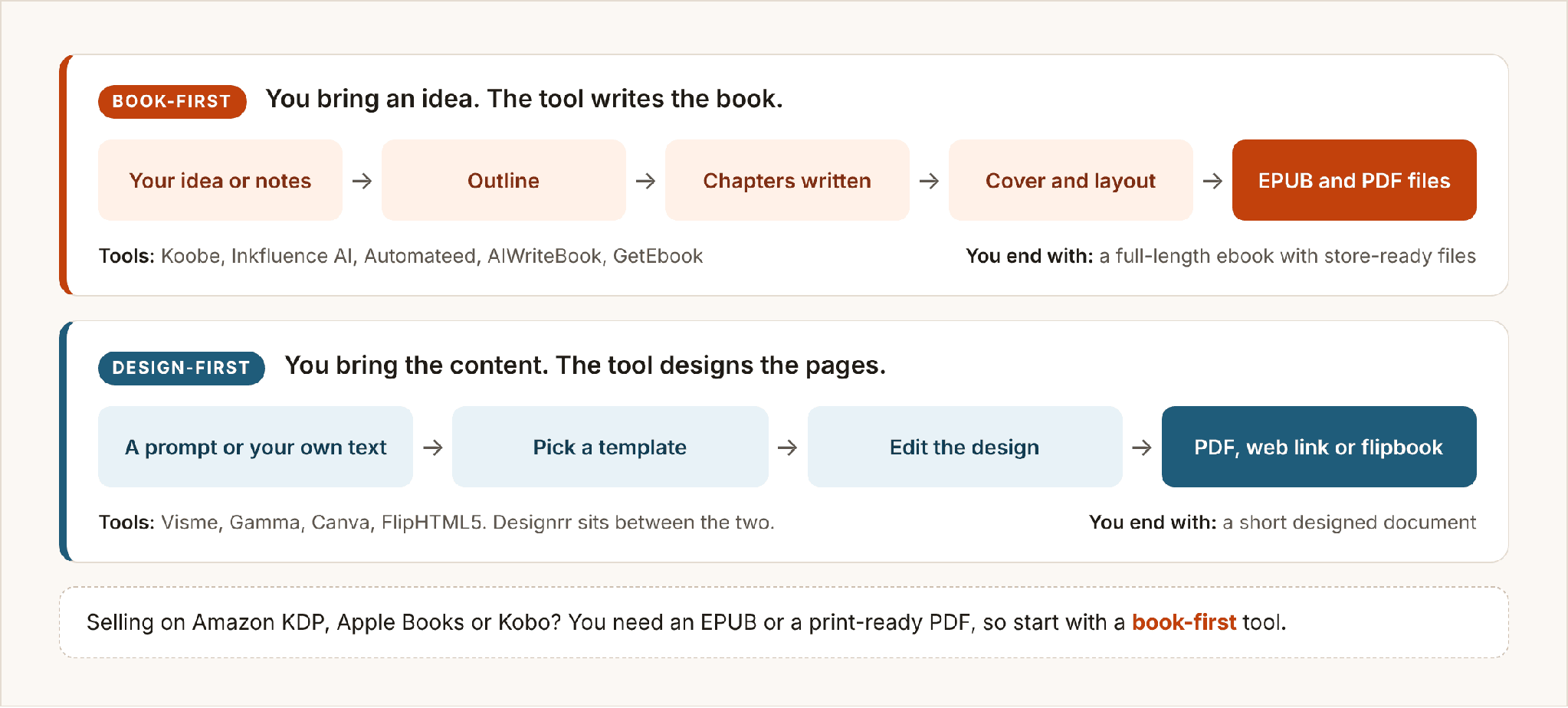
Book-first tools write the book. Design-first tools lay out content you bring.
How this list was put together
The research started with Google. Tools that show up when people search for an AI ebook generator in the US came first, then book-first tools that rank less often but fit the search were added. Tools that can produce an ebook from a prompt or from your own content stayed on the list, and pure writing assistants and layout-only tools were left out. A few of those are covered near the end.
For each tool, the company's own pricing and product pages were read on October 10, 2026, and five things were compared:
What you get at the end: a finished ebook, a short designed document, or text you still have to format.
The files: EPUB, PDF, print-ready PDF, paperback cover, Word.
The free plan: what you can do, and what you can download, without paying.
The price of the cheapest paid plan, and what it includes.
Who the tool suits, and who should look elsewhere.
The same book was not run through every tool, so the list does not rank on how well each one writes. Output quality depends on your topic and changes with every update, and you should judge it on your own subject. The 30-minute test in the how-to-choose section shows you how. Where a company's own pages disagreed or left something out, the article says so instead of guessing. Prices are in US dollars, monthly, unless stated otherwise.
Koobe is first because it does one job best: turning a topic into a finished nonfiction ebook with store-ready files. It does not try to be a novel writer, a design suite or a store, and that focus is also its main limit.
The 10 best AI ebook generators
1. Koobe: best for a finished, store-ready nonfiction ebook

Koobe's homepage on October 10, 2026. Screenshot: koobe.ai.
Koobe turns a topic or your own notes into a finished nonfiction ebook. You describe the book in a sentence, or upload notes or a draft (PDF, DOCX, Markdown or text). Koobe plans the chapters, and you edit the outline before any writing starts. You pick a length (Short is 6 chapters, Standard is 8, or choose Long), and Koobe writes the chapters, designs four cover options with your title on them, and lays the book out. After that you can ask the built-in assistant, in plain language, to shorten a chapter, add a missing section or tighten the tone, and undo anything you do not like.
What sets Koobe apart on this list is what comes out at the end. One brief gets you an EPUB, a digital PDF, a print-ready interior PDF, a cover image and a full paperback cover for KDP (back, spine and front). Many tools here stop at a PDF. Koobe also supports citations, tables, callouts and checklists, 24 languages, five trim sizes, four layouts and version history, and every plan includes commercial use.
Where it falls short. The free plan lets you create and preview one book and download a sample of chapter 1, but not the full book. Downloading everything needs a paid plan, from $23 a month on yearly billing ($29 month to month). Inkfluence AI costs less and lets you export a free preview. Koobe does not export Word (DOCX) files, does not publish to stores for you (you upload the files and answer each store's AI question yourself), and does not make audiobooks. It is also built for nonfiction. For a novel, look at a tool built for fiction, such as Sudowrite.
Quick facts
Free plan: create and preview 1 book, plus a free chapter 1 sample. No full download.
Paid plans: Starter $23 a month on yearly billing or $29 month to month (8 books a month), Pro $39 or $49 (20 books, 3 seats), Business $119 or $149 (75 books, 10 seats).
Files: EPUB, digital PDF, print interior PDF, cover JPEG, KDP paperback cover.
Extras: free tools on the Koobe site, including an EPUB checker and an ebook outline generator.

Koobe's pricing page on October 10, 2026, with yearly billing selected. Screenshot: koobe.ai/pricing.
Pick it if you want a finished nonfiction ebook, with files you can upload to Amazon, from one brief.
Skip it if you need Word files, a novel writer or a full free download.
2. Inkfluence AI: best for the lowest price and a free preview

Inkfluence AI's homepage on October 10, 2026. Screenshot: inkfluenceai.com.
Inkfluence AI writes a full book from a prompt and covers more book types than most tools here. Its site lists 33, including nonfiction, fiction, workbooks, cookbooks and devotionals. It has a cover studio with stock and AI images, a KDP-ready EPUB and print PDF, audiobooks with 49 voices, and translation into 59 languages.
Its biggest strength is price. The Creator plan is $9.99 a month, and the free plan lets you build part of a book and export a preview before you pay. It is the closest competitor to Koobe, and if budget is your main concern it may be the better pick.
Where it falls short. The free plan covers 5 chapters per book plus 5 more each month, so you cannot download a full book without paying. Plans are measured in chapters (35 a month on Creator), so a long book uses more of your allowance than a short one. Its own pages also differ on what the free plan exports: the pricing page lists a PDF, and the homepage mentions PDF and EPUB previews. Check before you rely on it.
Quick facts
Free plan: 5 chapters per book plus 5 more each month, with preview exports.
Paid plans: Creator $9.99 a month or $89 a year (35 chapters a month, no watermark, full commercial rights). Premium $19.99 a month or $179 a year (unlimited chapters and books, 30 audiobook chapters a month).
Files: PDF, EPUB and DOCX (EPUB and DOCX on paid plans), plus a print-ready PDF for KDP.
Extras: audiobooks, translation, cover studio.
Pick it if you want the cheapest route to a full draft and a preview you can look at before you pay. Skip it if you need a full book to download for free.
3. Automateed: best for a one-time payment and selling from its own store

Automateed's homepage on October 10, 2026. Screenshot: automateed.com.
Automateed generates ebooks from a brief and offers something the others here mostly do not: a one-time price. Instead of a monthly plan, its home page lists lifetime plans, where you pay once and get a set number of ebooks, images and tasks each month. The ebook workflow includes planning, editing, AI cover options and export.
It also has its own storefront. You can list a book on an Automateed store page, take payment through Stripe or a platform royalty route, and let readers order a printed copy through your store. For platform-route sales the page records an 85% author share before refunds or reversals.
Where it falls short. A lifetime plan is a bet on the company, and the page gives no refund terms (it links to a separate refund policy). Its standalone pricing page currently shows a "content retired" notice, so plan details sit on the home page. The free option is a short sample ebook, and its limits are shown inside the app, not on the page. The page also says export formats depend on the project type, so it does not spell out which formats come with which plan. It does not publish to Amazon KDP for you. You upload the files through your own KDP account.
Quick facts
Free plan: a short sample ebook preview, no card needed.
Paid plans: lifetime, paid once. Entry $149 (4 ebooks a month), Standard $239 (8), Pro $299 (12), Elite $997 (100). Extra credits and website hosting cost extra.
Files: PDF, EPUB and DOCX, depending on the project type.
Selling: your own storefront, with paperback copies ordered through it.
Pick it if you would rather pay once and sell directly from a storefront.
Skip it if you want refund terms and free-plan limits spelled out before you sign up.
4. AIWriteBook: best for writing, formatting and KDP steps in one place

AIWriteBook's homepage on October 10, 2026. Screenshot: aiwritebook.com.
AIWriteBook is a full authoring studio more than a one-brief generator. You start from an idea, notes or an imported Word draft. The outline builder plans the chapters, and the chapter writer drafts them to follow your outline and a sample of your own writing. A book editor then reads the whole manuscript, scores it on 30 criteria and writes an editorial letter, with line edits you accept or reject. It handles fiction and nonfiction (nonfiction can cite reference files you upload), plus picture books and comics.
The publishing side is strong too. It makes print-ready PDF interiors and wrap covers, with the spine and barcode worked out from your page count, plus EPUB and DOCX. A cover generator offers 21 art styles. A Chrome extension fills in the Details, Content and Pricing pages on Amazon KDP for you, and you press Publish yourself. It also has an audiobook studio with 25 voices and translation into 30 or more languages.
Where it falls short. It is a toolbox with many steps, so it takes more setup than a tool that turns one brief into a book. Its home page describes going from an idea to an outline and a first chapter, and does not say you can generate a whole book from one prompt. Credits add up too. The free plan has 100 credits (about 12 pages), and the Format step that produces the EPUB, print PDF and wrap cover costs 200 credits per book and is listed on Pro and above, not on the $12 Plus plan.
Quick facts
Free plan: 100 credits (about 12 pages), with the outline builder, character builder and a first chapter.
Paid plans: Plus $12 a month billed yearly (1,000 credits, about 200 pages), Pro $30 (5,000 credits), Ultra $120 (25,000 credits), all shown for yearly billing. A 7-day money-back guarantee is shown.
Files: DOCX on Plus and above. EPUB, print PDF, wrap cover and cover JPG through the Format step (Pro and Ultra).
KDP: Chrome extension for the Details, Content and Pricing pages (Plus and above).
Extras: book editor, audiobook studio and book translation (Pro and above).
Pick it if you want to write, edit, format and prepare a KDP upload in one workspace.
Skip it if you want a finished book from one brief, or you do not want to manage credits.
5. GetEbook: best for starting from one sentence, with book types up to a novel

GetEbook's homepage on October 10, 2026. Screenshot: getebook.ai.
GetEbook is a close competitor to Koobe. You type one sentence about what you know, and its assistant, Booker, turns it into a titled, chaptered brief, writes every chapter and designs a cover. It offers six book types, each with its own chapter range: lead magnets (5 to 7 chapters), research reports (8 to 12), how-to guides (10 to 12), interactive workbooks (10 to 15), online courses (15 to 20) and fiction novels (20 to 30). There is also a separate studio for print-ready coloring books.
You can preview the whole ebook for free, with no card, and edit it before you commit. The download is what you pay for. Pro plans export PDF, EPUB and DOCX, and include full commercial rights.
Where it falls short. Everything runs on credits that do not roll over: a lead magnet costs 25, a research report 30, a how-to guide or workbook 35, a course 45 and a novel 60. The $29 plan has 300 credits, which covers about 8 how-to guides a month. Its pages give chapter counts but no page or word counts, and the pricing page states no refund terms. Print-ready files are listed only for its coloring-book studio, not for regular books.
Quick facts
Free plan: no card needed; preview the whole ebook. No downloads.
Paid plans: one Pro plan in six sizes. $29 (300 credits a month), $39 (500), $49 (750), $59 (1,000), $79 (1,500), $99 (2,000).
Files: PDF, EPUB and DOCX on Pro.
Credits per book: lead magnet 25, research report 30, how-to guide 35, workbook 35, course 45, novel 60.
Pick it if you want to start from a single sentence and need anything from a lead magnet to a novel.
Skip it if you want to download for free, or dislike counting credits.
6. Visme: best for a designed ebook with brand control

Visme's homepage on October 10, 2026, showing its AI Designer. Screenshot: visme.co.
Visme is a design platform, and its ebook creator starts from templates: you pick one, add your content and customize it. Its AI Designer can build a first draft from a text prompt, as a full design of up to 10 pages, and you can then edit every page. Finished ebooks download as a PDF (with bleed marks for print), PNG, PPTX or HTML5, or you can share them online with a page-flip effect and a link.
If you care how the ebook looks, with your fonts, colors, charts and layouts, Visme gives you more control than a book-first generator does.
Where it falls short. It is a design tool, not a book writer. The AI Designer stops at 10 pages per generation, so a longer ebook means building the rest yourself. There is no EPUB export, so it does not suit selling on Kindle. Visme's own pages also disagree on the free plan: the pricing page lists PDF download on Free, while the ebook creator page says a PDF download needs a paid plan. Check before you rely on it.
Quick facts
Free plan: 10 AI credits a month, up to 50 pages per project, 500MB of storage.
Paid plans: Starter $12.25 a month billed annually ($147 a year, 200 AI credits). Pro $24.75 a month billed annually ($297 a year, 500 AI credits).
Files: PDF (with print bleed marks), PNG, JPG, PPTX, HTML5 and a shareable link. No EPUB.
Extras: a Brand Kit for your fonts and colors, on paid plans.
Pick it if you want a polished, branded PDF or web ebook and are happy to shape it page by page.
Skip it if you need a long book or an EPUB.
7. Designrr: best for turning content you already have into an ebook

Designrr's homepage on October 10, 2026. Screenshot: designrr.io.
Designrr starts from what you have already published. Paste the URL of a blog post, or import a Word or Google Doc or a PDF, and it lays the content out as an ebook, flipbook, PDF or web page. YouTube, video and audio files are transcribed automatically first. Its AI writer, Wordgenie, is included on the Standard, Pro, Premium and Business plans, although the pricing page lists no usage limits for it. Plans also include templates, cover designs and a 3D cover tool.
For a blogger, podcaster or course creator, it is a practical way to turn material you already own into a lead magnet or a short book.
Where it falls short. It is a conversion tool first. You supply the material, so it will not turn a one-sentence idea into a finished book the way a book-first generator does. No free plan is listed on the pricing page, which mentions a trial but gives no terms. EPUB, Kindle and flipbook export are listed from the $39 Pro plan up. The page does not say whether Designrr produces print-ready KDP files.
Quick facts
Free plan: none listed.
Paid plans: Standard $29 a month, Pro $39, Premium $49 (adds 4 hours of transcription a month), Business $99, Agency $249.
Files: Kindle, iBooks (EPUB) and flipbook export from Pro. The page lists no export formats for Standard.
Extras: Wordgenie AI writer, AI image generator (Premium and up).
Pick it if you have blog posts, videos or podcasts to repurpose.
Skip it if you are starting from a blank page.
8. Gamma: best for short visual guides and lead magnets

Gamma's homepage on October 10, 2026. Screenshot: gamma.app.
Gamma is an AI tool for documents, presentations and web pages, not a dedicated ebook builder. You type a prompt, and it produces a designed document with text, layout and images that you can then edit. For a short guide, checklist, report or lead magnet, it is quick, and the result looks finished.
Gamma works in cards rather than pages. The free plan generates up to 10 cards per prompt, and Plus and above go up to 100.
Where it falls short. Gamma is not built for long books. Its export list is PDF, PPTX, PNG and Google Slides, with no EPUB or Word, so it is not a route to Kindle or print. Paid plans remove Gamma branding. Credits are used up as you generate and edit, and the free plan's 400 credits are a one-time allowance at signup.
Quick facts
Free plan: $0, with 400 credits at signup and up to 10 cards per prompt.
Paid plans: Plus $12 a month, or $9 on annual billing (1,000 credits a month, up to 100 cards per prompt, Gamma branding removed). Pro $25 or $18 on annual billing (4,000 credits). Ultra $100 or $90 on annual billing (20,000 credits).
Files: PDF, PPTX, PNG and Google Slides.
Pick it if you need a good-looking short guide or lead magnet in minutes. Skip it if you need a full-length book or an EPUB.
9. Canva: best for full design control

Canva's homepage on October 10, 2026. Screenshot: canva.com.
Canva is the design tool many people already use, and its ebook templates are a good way to make a short, good-looking PDF. The AI side is an add-on rather than a generator. Magic Write and Canva AI can help draft text and create images, but you build the ebook page by page, and Canva's own ebook page does not describe a prompt-to-ebook feature. If that is the route you want, start from Canva's ebook templates.
Where it falls short. You do the assembly, so it is the slowest way here to get a long ebook. Canva's ebook page does not mention EPUB, and its pricing page lists PDF, JPG and PNG export. AI use is metered too: the free plan includes up to 20 standard or premium AI uses.
Quick facts
Free plan: $0, with up to 20 standard or premium AI uses.
Paid plan: Canva Pro, $144 a year for one person, with about 10 times more AI use than Free.
Files: PDF, JPG and PNG. EPUB is not mentioned.
Pick it if you want full control of the design and are comfortable laying out the pages yourself.
Skip it if you want the AI to produce the whole book.
10. FlipHTML5: best for interactive flipbooks you share by link

FlipHTML5's homepage on October 10, 2026. Screenshot: fliphtml5.com.
FlipHTML5 is known for turning PDFs into page-turning flipbooks, and its AI ebook generator builds on that. You choose "From a Topic" or "From Specific Content" (describe the topic, or upload a PDF or Word file), pick a page count from 1 to 10, and it creates an editable outline and a finished ebook with front and back covers. The result is an interactive online flipbook with a share link and a QR code, and you can embed it on your own site.
Where it falls short. It is for short ebooks, since the page dropdown stops at 10. The free plan can generate, edit and share by link, but it does not include downloads or removal of its branding. Downloads (PDF, HTML, EXE and more) are listed as an AI Plus feature, and the page does not say whether EPUB is available.
Quick facts
Free plan: 500 AI points a month (about 1 short ebook), no card needed. Sharing by link only.
Paid plan: AI Plus, $13 a month billed yearly (about 10 medium ebooks of 3,000 words each).
Files: an online flipbook, with downloads on AI Plus.
Pick it if you want an interactive, page-turning ebook to share by link, such as a short guide or catalog. Skip it if you need EPUB or print files.
Side by side
Files you get
Selling a book needs the right files. This is what each company's pages list. "Not listed" means the pages do not mention it, and a bracket shows the plan a format needs.
Tool | EPUB | Digital PDF | Print-ready PDF | Paperback cover | Word (DOCX) |
|---|---|---|---|---|---|
Koobe | Yes | Yes | Yes | Yes, full KDP cover | No |
Inkfluence AI | Yes (paid) | Yes | Yes | Cover sized for paperback | Yes (paid) |
Automateed | Yes | Yes | Not listed | Not listed | Yes |
AIWriteBook | Yes (Pro and up) | Not listed | Yes (Pro and up) | Yes (Pro and up) | Yes (Plus and up) |
GetEbook | Yes (Pro) | Yes (Pro) | Not listed | Not listed | Yes (Pro) |
Visme | Not listed | Yes | PDF with bleed marks | Not listed | Not listed |
Designrr | Yes (Pro and up) | Yes | Not listed | Not listed | Not listed |
Gamma | Not listed | Yes | Not listed | Not listed | Not listed |
Canva | Not listed | Yes | Not listed | Not listed | Not listed |
FlipHTML5 | Not listed | Yes (AI Plus) | Not listed | Not listed | Not listed |
What the free plans give you
Most tools here have a free plan, but few let you download a full book on it.
Tool | What $0 gets you | Full book download? |
|---|---|---|
Koobe | Create and preview 1 book, plus a chapter 1 sample | No |
Inkfluence AI | 5 chapters per book, plus 5 more each month | Preview export only |
Automateed | A short sample ebook | Not stated |
AIWriteBook | 100 credits (about 12 pages), outline builder and a first chapter | Not stated |
GetEbook | Preview the whole ebook, no card needed | No |
Visme | 10 AI credits a month, up to 50 pages per project | Its pages disagree (see Visme above) |
Designrr | No free plan listed | Not applicable |
Gamma | 400 credits at signup, up to 10 cards per prompt | Yes: PDF, PPTX and PNG are listed |
Canva | A free plan with up to 20 AI uses | Export is listed; check Canva's plan table |
FlipHTML5 | 500 AI points a month (about 1 short ebook) | No, link only |
What a month buys
Tool | Cheapest paid plan | What the allowance covers |
|---|---|---|
Koobe | $29 a month ($23 on yearly billing) | 8 books a month |
Inkfluence AI | $9.99 a month ($89 a year) | 35 chapters a month |
Automateed | $149 once (lifetime) | 4 ebooks a month |
AIWriteBook | $12 a month (yearly billing) | 1,000 credits, about 200 pages |
GetEbook | $29 a month | 300 credits, about 12 lead magnets or 8 how-to guides |
Visme | $12.25 a month (annual billing) | 200 AI credits a month |
Designrr | $29 a month | AI writer included, no allowance stated |
Gamma | $12 a month ($9 on annual billing) | 1,000 credits, up to 100 cards per prompt |
Canva | $144 a year (Pro) | About 10 times more AI use than Free |
FlipHTML5 | $13 a month (yearly billing) | About 10 medium ebooks of 3,000 words |
For the book-first tools, here is a rough cost per book on month-to-month billing. Inkfluence AI comes to about $2.50 if a book has 8 chapters (35 chapters for $9.99 covers four of them). GetEbook comes to about $3.40 for a how-to guide (35 of the 300 credits in its $29 plan). Koobe comes to about $3.60 ($29 for 8 books), or $2.88 on yearly billing. A book is a different size in each tool, so treat these as a guide, not a ranking.
How to choose
Start with what you need at the end, not with the tool.
You want to sell on Amazon KDP or other stores. You need an EPUB, a print-ready PDF and, for paperback, a cover with a spine. Koobe and AIWriteBook list all three. Inkfluence AI lists a KDP-ready EPUB and print PDF. GetEbook and Automateed list EPUB.
You want a lead magnet or a short guide. Visme, Gamma, Canva or FlipHTML5 will give you a designed PDF or link fast. Koobe's Short length (6 chapters) works too.
You already have content. Designrr takes blog URLs, documents, PDFs and video or audio. Koobe also accepts uploaded notes or a draft.
You have the smallest budget. Inkfluence AI at $9.99 a month, or Canva's free plan if you will design the pages yourself.
You would rather pay once. Automateed's lifetime plans start at $149.
You want editing, formatting and KDP steps in one workspace. AIWriteBook.
You are writing fiction. GetEbook offers a novel type, and tools such as Sudowrite and Squibler are built for it.
A 30-minute test before you pay
Output quality depends on your topic, so test two tools on the same subject:
Pick a topic you know well, and write one sentence about the reader and one about the promise of the book.
Ask each tool for an outline, and see how easily you can change it.
Generate two chapters. Look for repeated points, made-up facts and a flat tone.
Try the editing tools: shorten a chapter, add a missing section.
Export, open the EPUB on your phone and click through the table of contents.
Look at the cover at thumbnail size, the way a buyer will see it.
Choose the tool you would actually publish from.
More AI ebook tools you will see in search results
A few other tools show up when you search for an AI ebook generator. They are real products, but each fits a narrower job than the ten above.
Piktochart turns a topic or an uploaded document into a multi-page ebook with a designed cover. The free plan gives 60 AI credits a month and sharing by link. PDF and PNG downloads are on Pro, and the company says it does not offer EPUB or DOCX.
Venngage builds a template-based ebook from a prompt or pasted content, and lists PNG, PPTX and PDF downloads. It says a free plan lets you try its AI features. No prices are listed on that page.
Template.net generates ebooks with chapters, titles and subheadings from a topic, genre and tone, and has a drag and drop editor. It lists EPUB, PDF and DOCX export and says the tool is free for personal and basic professional projects. Its page shows no prices.
Ebook GPT writes, illustrates and formats ebooks in categories such as children's books, recipes, manga and informative guides. It lists PDF, EPUB, a KDP print size, a flipbook and audiobook output. Its page shows no prices.
Scribe turns process guides recorded with its tool into an ebook, with PDF and ePub export. It suits training and how-to material, not general books.
Storydoc generates interactive, scroll-based ebooks from a prompt, an outline or existing content, and shares them by link. It offers a 14-day free trial and lists no download formats. Storydoc is mainly a presentation tool.
Jasper is a marketing writing assistant. Its own ebook article credits it with writing help, templates and an image generator, but does not say it designs layouts or exports ebook files.
ChatGPT and Claude can draft a manuscript chapter by chapter, but you handle the structure, layout and files yourself.
Formatting tools such as Atticus and Vellum, which prepare a finished manuscript but do not write it, and fiction tools such as Sudowrite and Squibler were also left out.
What no AI ebook generator does for you
None of these tools knows your story, checks your facts or takes responsibility for what you publish. Before you publish:
Read every chapter and cut what is generic.
Add your own examples, numbers and opinions.
Check every statistic, name, date and quote.
Answer each store's AI disclosure question accurately. Amazon KDP asks about AI-generated content when you publish.
Readers notice thin books, so make fewer books and make each one good.
Frequently asked questions
What is the best AI ebook generator?
It depends on the ebook. For a finished nonfiction ebook with store-ready files, pick Koobe. For the lowest price, pick Inkfluence AI. For a short designed PDF, pick Visme, Gamma or Canva.
Is there a free AI ebook generator?
Most tools here have a free plan, but few let you download a full book on it. Koobe lets you create and preview a book and download a chapter 1 sample. Inkfluence AI exports a preview, and GetEbook lets you preview the whole ebook. Gamma's free plan lists PDF, PPTX and PNG export. See the free-plan table above.
Which AI ebook generators export EPUB?
Koobe, Inkfluence AI, Automateed, AIWriteBook, GetEbook and Designrr list EPUB, some only on paid plans. Template.net and Scribe list it too. Visme, Gamma, Canva and FlipHTML5 do not list EPUB.
Can ChatGPT write a whole ebook?
It can draft chapters, but one prompt will not give you a finished ebook. You prompt chapter by chapter, keep track of what each chapter covers, then format and export the book yourself.
Can I sell an AI-generated ebook on Amazon?
Yes, but Amazon KDP asks whether your content is AI-generated when you publish, and you stay responsible for its quality and accuracy. Check each store's current AI disclosure rules before you upload.
Do I own an ebook made with an AI generator?
Check each tool's terms. Koobe says you own what you make and every plan includes commercial use, and Inkfluence AI lists full commercial rights on its paid plans. Copyright rules for AI-made text differ by country and are still changing, and the parts you write or heavily edit yourself are on firmer ground. This is general information, not legal advice.
Should I choose EPUB or PDF?
Choose EPUB for Kindle and most ebook stores, because the text reflows to fit any screen. Choose PDF for fixed layouts, lead magnets and print.
Where Koobe fits
If your goal is a finished, formatted nonfiction ebook you can publish, Koobe is built for that path: describe the book, edit the outline, review the chapters, pick a cover and export the files. You can try it with your first book free, then compare the result with any other tool on this list.
The short answer, again
A finished nonfiction ebook with store-ready files: Koobe.
The lowest price, or the most book types: Inkfluence AI.
A one-time payment and your own storefront: Automateed.
A writing studio with KDP helpers: AIWriteBook.
A start from one sentence, up to a novel: GetEbook.
A short, branded, designed PDF: Visme, Gamma or Canva.
Blog posts, videos or podcasts to repurpose: Designrr.
An interactive flipbook: FlipHTML5.
Test two tools on the same topic before you commit to either.
Update log and sources
October 10, 2026: Prices and features were checked against each company's public pages on this date. The list and the year in the title are refreshed every January, and prices are updated when plans change.
Pages checked on October 10, 2026:
Automateed: home page
Visme: pricing, ebook creator and AI Designer
Gamma: pricing
FlipHTML5: AI ebook generator
The tools in the "more tools" section: the pages linked there