
How an article is written
The five steps behind every article: finding official sources, reading them and taking screenshots, writing, checking every fact, and the featured image.
Every article is researched from real pages before a word is written, and every fact in it can be traced to the exact words on its source. It takes about 10 minutes, and you can leave the page while it works: the article shows each step as it happens.
Before it starts: the topic
Each post in your plan targets one search, chosen because you can win it: searches you're already close to page one for, questions people ask, and topics your competitors cover that you don't. No two posts compete for the same search. Each comes with an angle, the sections it should cover and the pages of yours it should link to. You can see all of it on the article's Plan tab, and change the keyword in Details.
Topics you add yourself are written the same way; the writer works out the angle and sections.
1. Finding the sources
Writing Studio searches the web like a journalist: what ranks for this search, what those pages cover, and what a post needs to be better. It then makes a reading list of 8 to 18 official pages: pricing pages, product pages, help centres, policies and primary data, not other blog posts' summaries. Your own site is left out, so the article never quotes itself.
It also reads your best posts, to match their depth and how they're laid out.
2. Reading the sources and taking screenshots
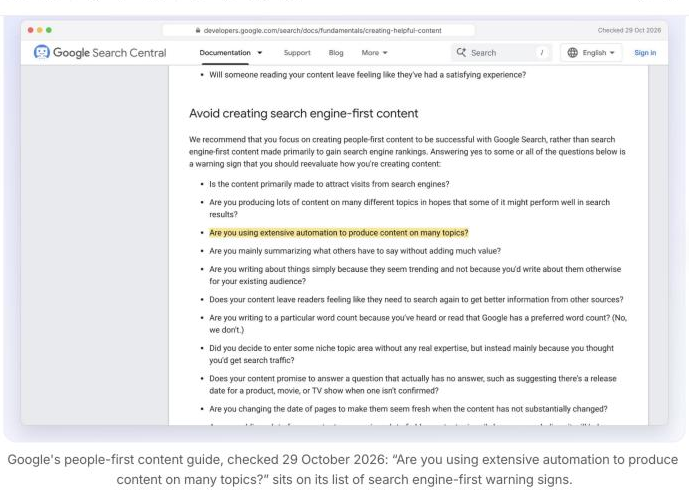
Writing Studio opens each page in a real browser, so prices and details that only appear once a page loads still count. From them it takes 15 to 45 facts, each kept with the exact words on the page (5 to 40 of them) and the month it was checked. Every quote is matched against the page before it's used.
It also makes the article's pictures:
- Screenshots of the sources, with the quoted line highlighted, framed with the page's address and the date it was checked
- Screenshots of your own pages where they help, like your pricing or product
- A card or two that sums up a comparison or a checklist, in your site's colours and font
Pages that block visitors like us, or ask for a bot check, are skipped.
3. Writing the article
The article is written from those facts only, in your voice and for the readers you set in Written for. What to know is taken as given and never contradicted, and Words to avoid are never used. See Voice and what to know.
- It opens with a direct answer to the search in two or three sentences, then clear sections.
- Comparisons get a table.
- Facts that change, like prices, say when they were checked.
- Sources are linked in the text where they're used, not in a list at the end.
- It links to three to five of your own pages, each once.
- It ends with an FAQ, and comes with a title, address, title on Google and description on Google.
There's no fixed length. A narrow question might take 800 words and a full comparison 3,000 or more; if your best posts are long, it matches them.
4. Checking every fact
An editor reads the draft against the facts: every price, limit, date and number must match a source, wrong ones are fixed and anything without a source is cut. It also cuts filler, checks the voice against your best post, and removes any link that isn't one of your pages or a source it read.
5. Making the featured image
The image for the top of the post and link previews, as a card or an illustration. See Featured images.
When it's ready
The article shows as Ready for review (or Scheduled, if auto-publish is on). Then:
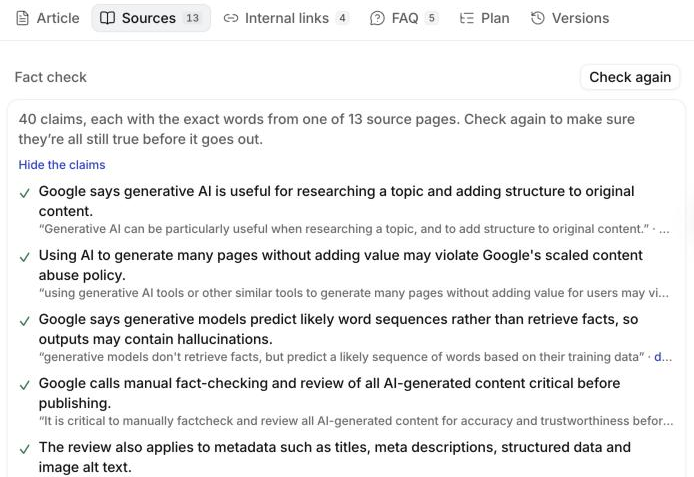
Sources has every fact with its quote. Check again before it goes out to make sure each quote is still on its page. See Your plan and articles.
SEO checks on the right confirm the basics: the keyword in the title, an answer in the first paragraph, title and description lengths, subheadings, links, sources, FAQ and the featured image.
When it's written
- Write it now (on the article, or from the box on Home): straight away.
- Your plan: each planned post is written three days before its date, so it's ready for you to read. These can take up to a few hours, as they're written when it's cheapest.
If something goes wrong
If a step fails, the article goes back to Planned with what happened, and it doesn't count towards your month: only articles that get written do. If Writing Studio is very busy, your article waits and carries on by itself. If the editor's check can't finish, you get the first draft, marked Kept the first draft.
Can’t find what you need? Email us.